Key takeaways
- Deep linking failures fall into two categories: platform constraints that iOS and Android control, and implementation gaps your team controls. Knowing which you’re dealing with changes where you look first.
- Branch links use universal links and App Links under the hood, with automatic fallback to URI schemes when those mechanisms fail. Customers add their credentials to the Branch Dashboard and Branch handles the rest.
- Even Branch links can break due to incorrect link configuration, a credential mismatch between the Branch Dashboard and the app build, and race conditions in the app’s routing logic.
- If a Branch link opens the app but lands on the wrong screen, start with the Branch Link Validator. If the app isn’t opening, the issue is often a credential mismatch in the Apple App Site Association (AASA) or DAL file.
Deep linking failures are a common issue mobile teams come to us with. The details vary, but the shape of the problem is usually the same: A link that worked fine in testing breaks in production. Or it works on one device and not another. Or it worked last month and nothing in the codebase changed.
What makes these failures especially frustrating is that they’re usually silent. When software breaks, you get a signal you can trace back to a cause. With deep linking failures, you often get none of that. The link just doesn’t open the app, or the user lands in the wrong place, and there’s nothing telling you why.
After working through these issues with mobile teams across industries, we’ve built up a clear picture of where deep links fail, why they fail, and what it takes to build deep links that hold up in production.
Why do deep links break?
Deep linking failures generally fall into two categories. The first covers implementation gaps that your team controls and can fix. The second addresses platform constraints that iOS and Android own, that no software development kit (SDK) can fully override, only work around. Identifying which category you’re dealing with changes how you approach the fix.
Most production failures involve some combination of both.
iOS universal links
Universal links are Apple’s preferred mechanism for routing users from the web into your app. They’re also one of the places where we see the most production failures. Understanding them entails separating two distinct failure points.
The first is whether the app opens at all. This is an iOS-level decision: Apple controls whether a universal link opens the app or falls back to the browser. That decision happens before your SDK gets involved. The second is whether the app routes the user to the right screen once it opens. That’s a different problem with different causes. Either the link data isn’t being surfaced correctly, or the app’s routing logic isn’t handling the values it receives.
The AASA is the most common culprit when the app isn’t opening. The AASA file is how iOS verifies that your app is authorized to handle a given domain. If it’s misconfigured, cached in a stale state, or served with the wrong content type, iOS falls back to the browser with no indication that anything went wrong. The file is also cached on-device after install, which means a configuration fix you deploy won’t reach existing users until they update the app.
Then there’s what we think of as the user intent problem. iOS tracks behavior over time, and if a user previously chose to open a link in Safari instead of the app, iOS may treat that as a standing preference and keep routing to the browser on future taps. This is the most common explanation for links that “randomly stop working” for specific users when nothing has changed on the developer side.
In-app browsers add another layer. Universal links frequently don’t fire inside Instagram, TikTok, Facebook, or Gmail because those apps run embedded webviews that intercept the link before iOS routing logic gets involved. This is one of the harder failure modes to catch in testing because most QA happens in Safari or Chrome, not inside a social app webview. In these scenarios, Branch links use URI schemes to open the app with the expected user experience.
Deferred deep linking on iOS
Deferred deep linking is the post-install flow: A user taps a link, doesn’t have the app, installs it from the App Store, and then gets routed to the right content. It’s one of the highest-value flows in mobile growth, and on iOS post-iOS 14, it’s also one of the harder ones to get right.
Apple’s privacy changes introduced fingerprinting restrictions, Private Relay, and tracking limitations that make it harder to match a pre-install click to a post-install session with confidence. Failed matching sends users to the home screen instead of the content they expected, with no indication that anything went wrong on their end.
Cold start timing is a separate but related issue. A user taps the link, the app launches, the deep linking SDK initializes asynchronously, and navigation logic runs. If routing fires before the callback resolves, which is common on cold starts, the user lands in the wrong place. This is a common source of “the link opens the app but not the right screen” reports. It’s also why Branch lets you fetch the latest referring parameters from the SDK throughout the app session, not just at initialization, in case your routing system needs more time to startup.
Android App Links
Android App Links have their own failure patterns. Digital Asset Links configuration is the Android equivalent of the AASA file. If you get it wrong, the system falls back silently. Android’s device fragmentation adds another layer, since routing behavior that works on a Pixel can fail on certain Samsung or Xiaomi devices due to OEM customizations.
Web-to-app flows
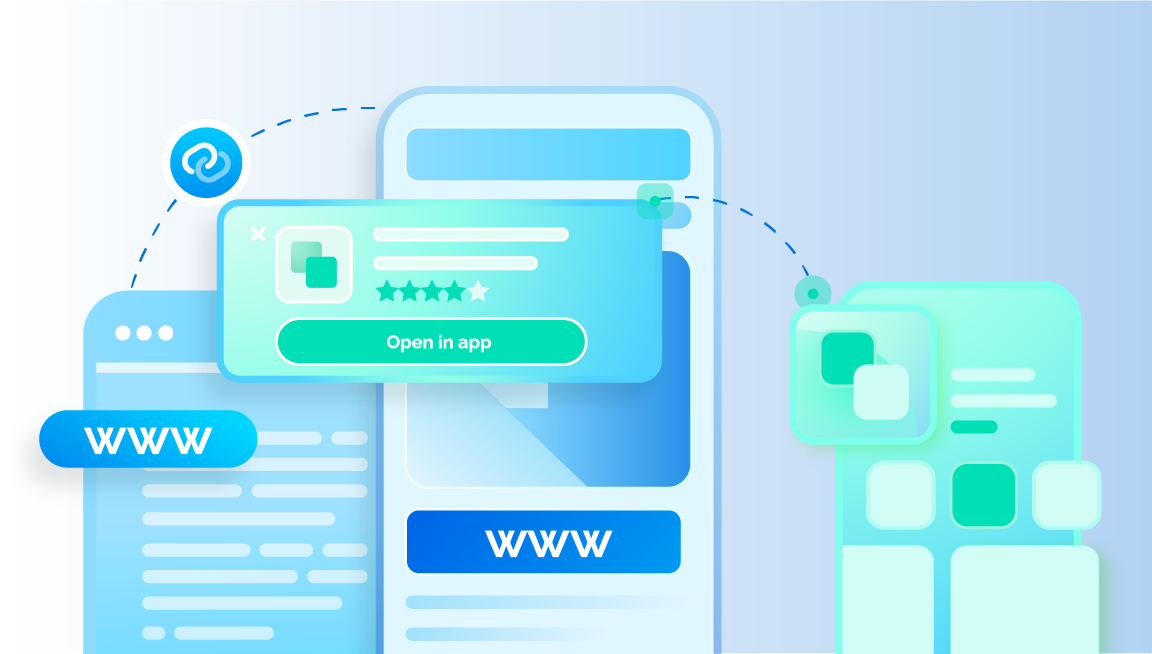
Getting a user from a mobile web page into your app sounds straightforward, but the routing chain has unexpected failure points.. Universal links don’t always fire in a mobile browser context, and fallback behavior varies across devices and OS versions. When something breaks, the user typically just ends up on the web with no obvious path forward.
In-app browsers and walled gardens
A large share of real-world link taps don’t happen in Safari or Chrome. They happen inside Instagram, TikTok, Facebook, Gmail, and other apps that run their own embedded webviews. Those environments intercept links before iOS or Android routing logic gets involved, which means universal links often never get a chance to fire at all.
This is a common failure mode in production and one of the easiest to miss in testing. Most QA happens in a standard browser, but most real user traffic doesn’t. Deep linking best practices tend to focus on the expected path, and walled garden behavior is a different problem that needs its own mitigation strategy.
How Branch handles common deep link failures
Branch handles the technical complexity of deep linking so your team doesn’t have to. You add your app credentials to the Branch Dashboard once, and Branch takes care of hosting the files that tell iOS and Android your app is authorized to handle your links, managing the fallback logic when the preferred routing mechanism fails, and routing each click through whichever mechanism will actually work in that context.
Here’s what that looks like under the hood: When you set up Branch, you add your app credentials to the Branch Dashboard: the Bundle ID and App Prefix for iOS, the package name and SHA256 for Android, and a URI scheme for fallback. Branch uses those credentials to host the AASA file on iOS and the Digital Asset Links file on Android, which enables Branch links to use universal link functionality on iOS and App Link functionality on Android automatically.
When a user clicks a Branch link, Branch reads the context of that click in real time and routes through whichever mechanism is most likely to work. In a standard mobile browser, that’s a universal link or App Link. Inside a walled garden like Instagram or TikTok where those mechanisms are blocked, Branch falls back to the URI scheme. You don’t have to manage that fallback logic; Branch handles it based on where the link is clicked.
A standard deep link gives you one path. Branch links move through a fallback chain designed to get the user to the right destination even when the preferred routing mechanism fails.
What causes Branch links to break?
Branch links operate within the constraints that Apple and Google impose, and those constraints create failure modes that no SDK can fully prevent. When a Branch link breaks, it’s usually one of three things:
- An incorrect link configuration like invalid syntax or missing link data
- A mismatch in credentials between the AASA/DAL file and the build installed on the device (causes the app not to open when the link is clicked)
- A race condition in the app routing code attempting to route the user before the deep link data is made available (most common in cross-platform architectures like React Native)
How to troubleshoot common Branch link failures
If you’re experiencing a deep linking issue, take these steps to understand what’s causing the issue and how to resolve it:
- Use the Branch Link Validator to examine the link data.
You can do this via the UI in Links or by adding &debug=1 to the end of a Branch link. On the Link Validator screen, you’ll see the link’s expected behavior on various platforms, and the link data included in it. Make sure the link contains the deep link data, like the $canonical_url or $deeplink_path, in the format that your app expects.
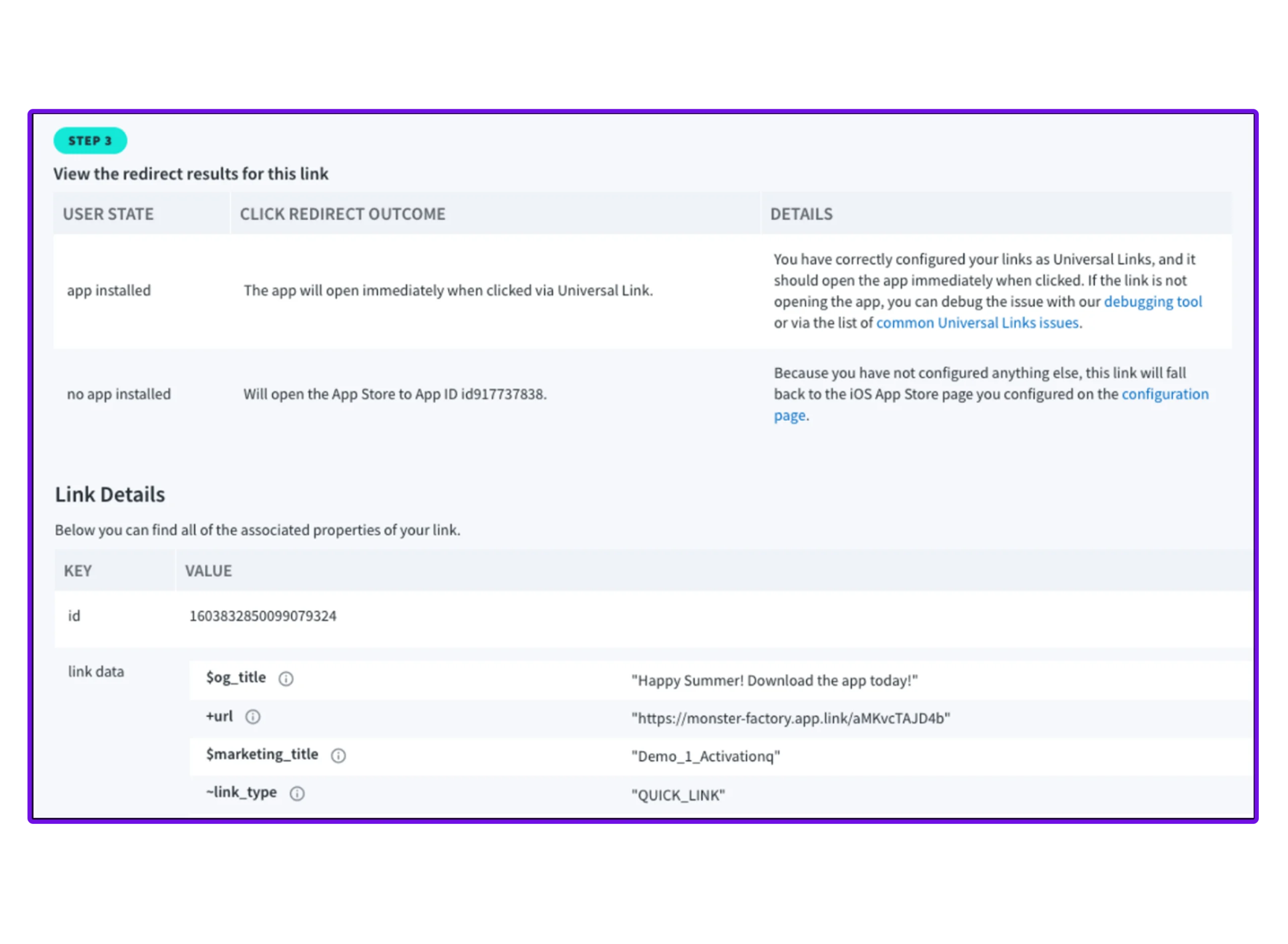
- If clicking the link does not open the app, the root cause is likely an issue with the AASA or DAL files.
On iOS, check that the Bundle ID and App Prefix added on the Branch Dashboard match up with those same credentials for the build you are testing with. On Android, make sure that the package name and SHA256 specified on the Branch Dashboard match the ones used to sign your build. Double check that you’ve added a Branch-specific URI scheme on the Branch Dashboard so that the app will open via URI scheme from places like social platforms where Universal Links and App Links get blocked. To spot the mismatch, run Branch’s Integration Validator automated testing tool (Android | iOS).
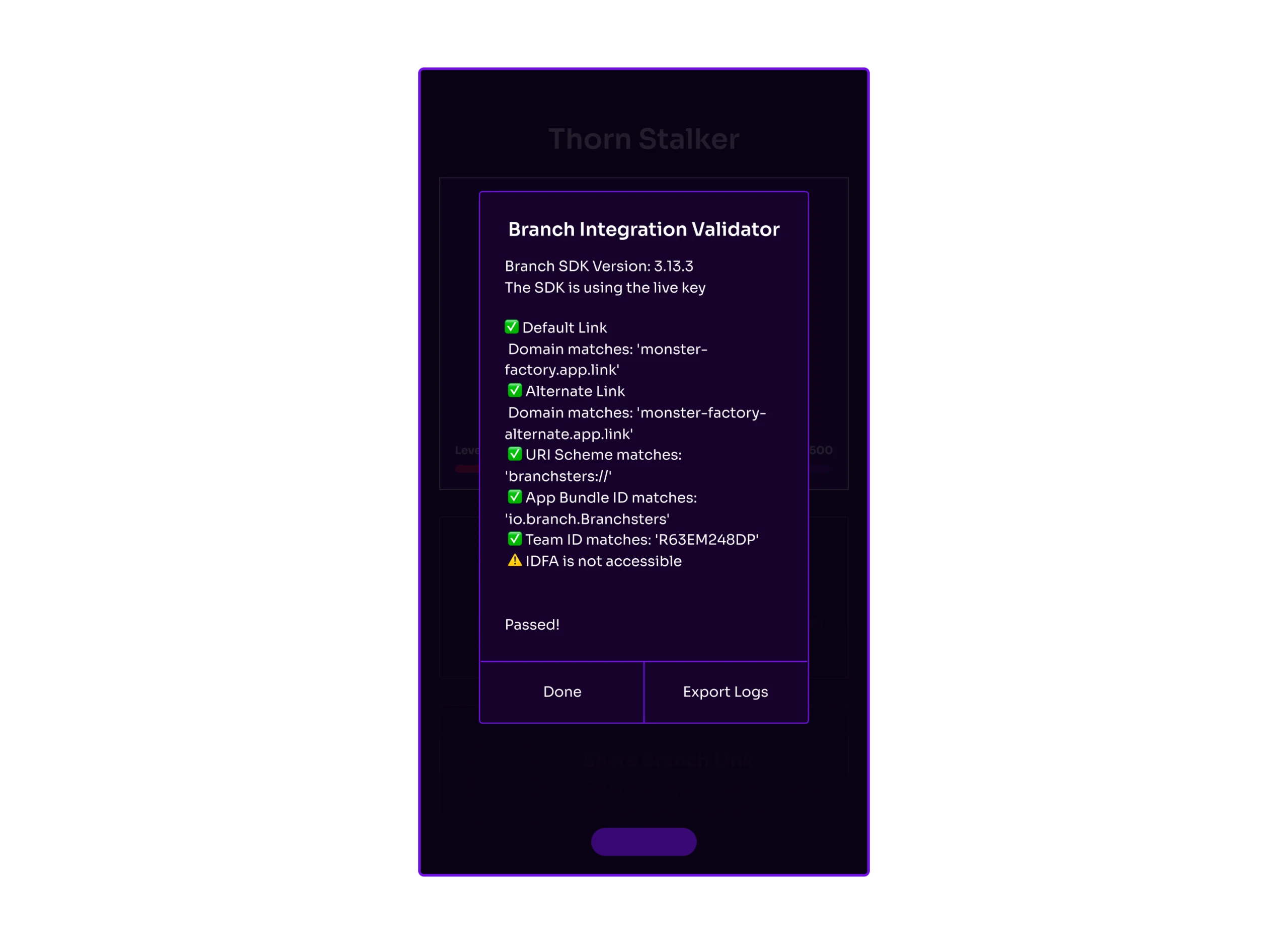
- If the app opens but doesn’t route correctly, the issue is in the app code.
Enable logging in the Branch SDK to check whether the expected link data is being retrieved, then use breakpoints in your code editor to trace where the data is getting lost or parsed incorrectly. If you’re testing a link from email or ads, try creating a short link with the same deep link data to isolate whether the issue is specific to a product or link type.
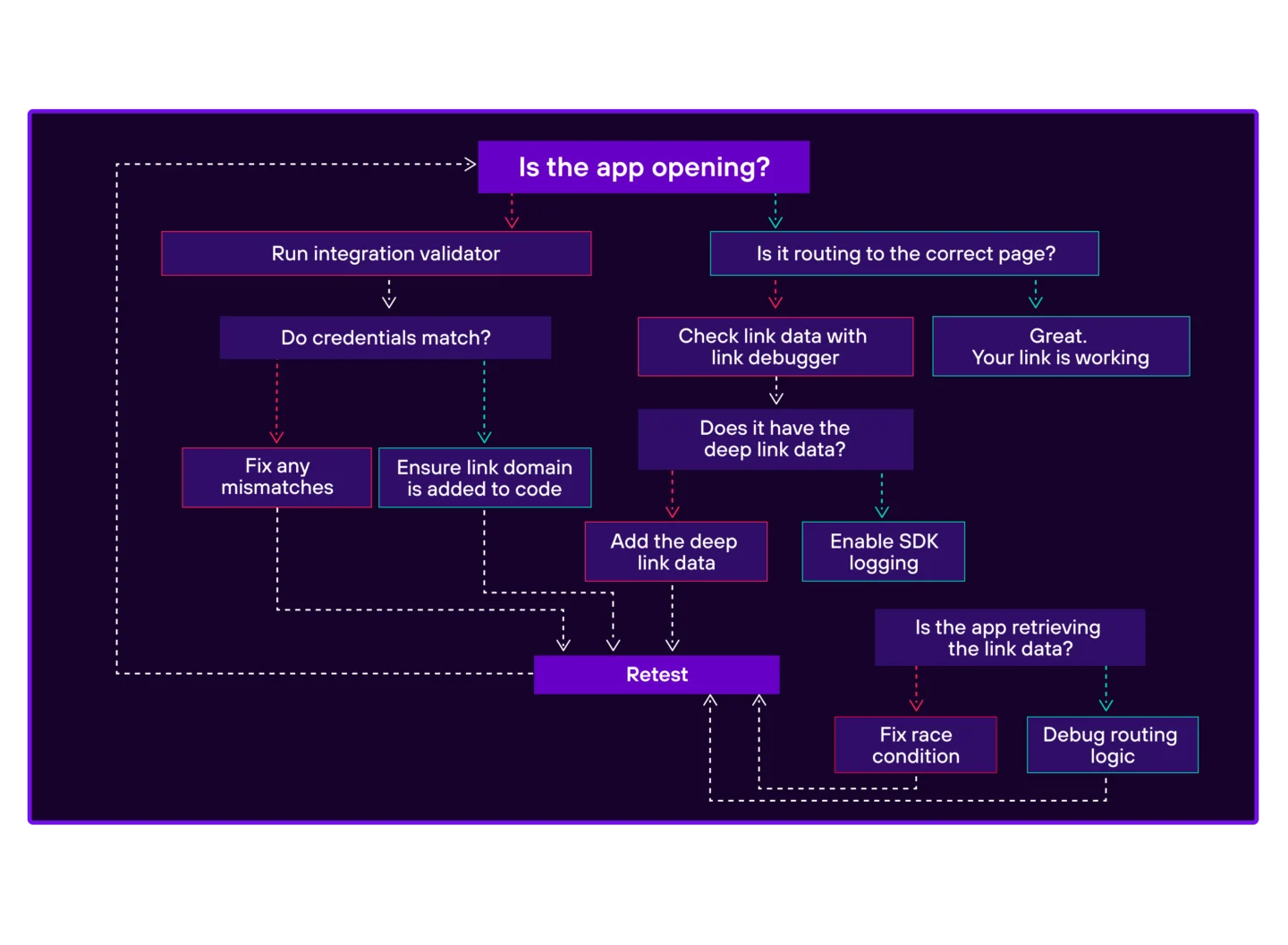
Use this chart to help you debug issues with your deep links.
Best practices to avoid deep link failures
- Use $canonical_url for deep linking whenever the app has a corresponding web destination. It contains the full web URL that the app can parse and route with. Your marketing team won’t need to pull in a developer every time a new route is added to the app. Many Branch products, like Email and Banners will automatically add the web URL to the Branchified link.
- Always confirm your app is using the live Branch key before pushing to production. If links worked in testing and broke after release, a test key left in the build is one of the first things to check.
- When parsing web URL values in Branch payloads, include logic to unencode URL-unsafe characters. Depending on how links are created, web URL values will typically include escape characters, and if your routing logic isn’t set up to handle them, values won’t be recognized and the deep link will fail silently.
- Build a home screen fallback into your routing logic. If a deep link value isn’t recognized or is missing, landing the user on the home screen is significantly better UX than a crash or an infinite spinner.
FAQs
Branch links work alongside iOS universal links and Android App Links. When you set up Branch, you add your app credentials to the Branch Dashboard and Branch hosts the AASA file on iOS and the Digital Asset Links file on Android on your behalf. This enables Branch links to use universal links on iOS and App Links on Android automatically. If those mechanisms fail, Branch falls back to a URI scheme. You don’t manage that fallback logic; Branch handles it based on the context of the click.
You only need to configure universal links, App Links, or URI schemes outside of Branch when you have existing routing you don’t want to migrate, or when you need to deep link with Google Ads or SEO. This requires hosting the AASA and DAL files on your own top-level domain rather than Branch’s.
Deep links break in production for a few reasons that don’t show up in testing. Universal links behave differently inside the social apps and email clients where most real link taps occur. Most QA happens in Safari or Chrome instead. AASA files are cached on-device after install, so a configuration fix won’t reach users until they reinstall. Cold start timing issues, where navigation logic fires before the callback resolves, are easy to miss if the app is already running when you tap the link during testing.
When a Branch link opens the app but lands on the wrong screen, it’s typically one of two things. Either the link is missing the deep link data the app needs to route correctly, something the Branch Link Validator can surface quickly, or the app’s routing logic is running before Branch has finished retrieving the link data. The fix is to delay navigation until the Branch callback has resolved rather than assuming the data will be available immediately on launch.
When deep links stop working for specific users but not others, the most common explanation is iOS user intent tracking. If a user previously chose to open a link in Safari instead of the app, iOS may treat that as a standing preference and keep routing to the browser on future taps, even if nothing has changed on the developer side. This is an iOS-level behavior that sits outside Branch’s control, though Branch’s fallback chain is designed to maximize the chances of the app opening even in these cases.
Deep links don’t always work inside Instagram, TikTok, and Gmail. This is one of the most common production failure modes. Those apps run embedded webviews that intercept links before iOS or Android routing logic gets involved, which means universal links often never fire. Branch addresses this by falling back to a URI scheme in walled garden contexts. You configure the URI scheme on the Branch Dashboard, and Branch uses it automatically when the preferred routing mechanism is blocked.