DYNAMIC LINKS MIGRATION
How to migrate from Firebase Dynamic Links
If you’re still using Firebase Dynamic Links (FDL), it’s time to make a plan. Back in summer 2023, Google announced that it would fully deprecate FDL by Aug. 25, 2025. This guide breaks down everything you need to know about the shutdown, including how long you have to migrate, how Branch stacks up to FDL, and steps for migrating your links.
How to migrate from Firebase Dynamic Links to Branch links
The transition from one deep linking provider to another can be daunting. The good news is that Branch is here to help — and we’ve already helped FDL customers migrate smoothly.
Before you start migrating your Firebase Dynamic Links to Branch links, confirm that you have:
- Developer resources available for your mobile app.
- Identified all of your existing Firebase Dynamic Links to transition.
We also strongly recommend that you keep the Firebase SDK implemented during the migration from Dynamic Links. Because the Branch SDK and deep linking can be implemented alongside the Firebase SDK, you’ll have time to ensure that the transition is seamless.
Review our help docs for more detailed information as you kick off your Firebase project.
1. Create your Branch Dashboard account
2. Configure your Branch Dashboard account
- Navigate to the configuration page to configure your app settings.
- Set your redirects per platform and specify the correct app configuration settings.
- Set your social media preview, including title, description, and thumbnail image.
- Establish your link domain. Use a default link domain or set a custom domain for your deep link URL.
3. Integrate the Branch SDK and set up deep link routing
We have detailed guides for integrating the Branch SDK into your mobile app, based on the platform you’re using:
Native Platforms
- Android (Make sure I have an Android app is enabled in your Dashboard configuration)
- iOS (Make sure I have an iOS app is enabled in your Dashboard configuration)
Plugins/Wrappers
- Adobe Launch (Android | iOS)
- Capacitor
- Cordova PhoneGap Ionic
- Flutter
- mParticle (Android | iOS)
- React Native
- Unity
- Xamarin (Android | iOS
These integration guides cover the essentials of setting up deep link routing for your app. Plus, we have additional resources on in-app routing.
4. Verify Branch links
During the integration process, you should have tested your Branch links. Now, you’re able to:
- Redirect Branch link clicks to your website or relevant mobile app store listings if the app isn’t installed or if it’s a web-only link.
- Open your mobile app when a Branch link is clicked, if the app is installed.
- Deep link into specific in-app content when the app is installed.
5. Understand parameter mapping
Before migrating Firebase Dynamic Links to Branch links, it’s important to understand how the parameters map between the two. If your Dynamic Links utilize specific parameters for certain behaviors or analytics, refer to this table to see the equivalent Branch parameters for the same results.
For some Firebase parameters, Branch doesn’t have an exact equivalent. This is because Branch doesn’t require that specific parameter to achieve the same behavior — it’s automatically handled through your Dashboard configuration.
Migrating your links can be a time-consuming process, especially if you have a significant number of links in use. Learn how our support team can help you transition from Firebase to ensure your live links don’t break.
6. Migrating links created from the Firebase console
Firebase Dynamic Links created in the Firebase console are useful for creating promo links to share on social media through a user interface.
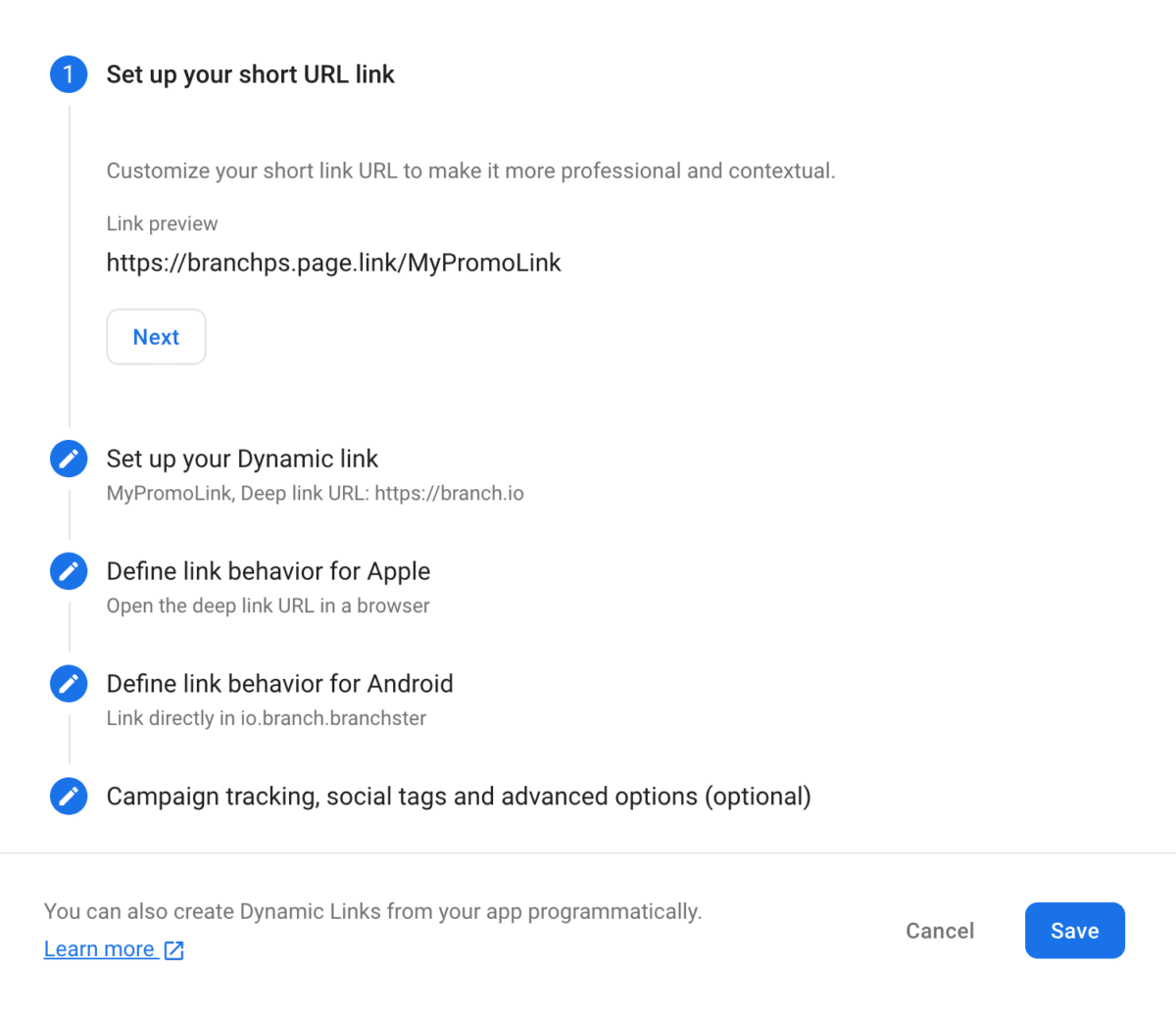
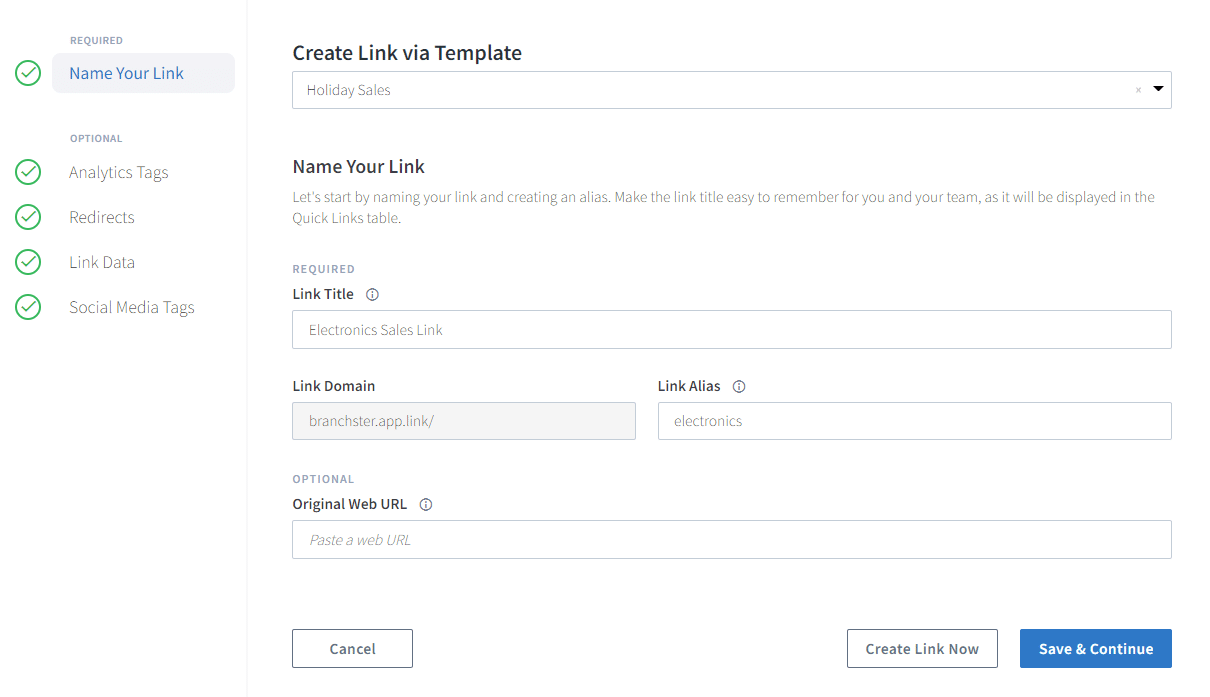
To create the Branch link equivalent to Firebase Console, utilize the Branch Dashboard to create a Quick Link.
7. Migrating links created from the Dynamic Link Builder API
Firebase Dynamic Links created through the Dynamic Builder API (iOS | Android | Flutter) are useful for dynamically creating links in your app for user-to-user sharing or in any situation that requires a high volume links.
To create the Branch link equivalent of Dynamic Builder API, use Branch’s relevant SDK methods: iOS, Android, Flutter. Review these code snippets in our help documentation.
8. Migrating links created from the REST API
Firebase Dynamic Links created through the REST API are useful for dynamically creating links on platforms that don’t have a Builder API.
To create the Branch link equivalent to REST API, use Branch’s Deep Link API. Review these code snippets in our help documentation.
9. Migrating long links manually
Manually created Firebase Dynamic Links are useful if you don’t need to track click data and don’t care if links are long:
https://your_subdomain.page.link/?link=your_deep_link&st=your_title&sd=your_descriptionTo create the equivalent Branch link, use Branch’s long links:
https://your_subdomain.app.link/?$canonical_url=your_deep_link&$og_title=your_title&$og_description=your_description10. Additional Branch Link creation options
There are other ways to create Branch links that might better fit your marketing strategies and processes. Some of these options, like bulk creation, can make your migration easier.


Bulk link create API
Programmatically create short links in bulk via Branch’s Deep Linking API.

QR code API
Programmatically create QR Codes via Branch’s QR Code API.
Note: Using this request will output your QR Code in the directory where the request was made and in the format defined in the request.
Deep linking with Branch vs Firebase Dynamic Links
Here’s a quick feature comparison to help you see how Branch stacks up against Firebase Dynamic Links for your deep linking needs.
The good news: Moving from Firebase Dynamic Links unlocks advanced use cases and functionality
Unlike FDL, Branch is a linking and measurement partner, which means you get reliable links and accurate attribution across your owned, earned, and paid channels.
1. Boost app acquisition and engagement
Drive conversions with seamless customer journeys across every touchpoint, including web-to-app banners, deep-linked email, QR codes, SEO attribution, connected TV, and paid ads.
2. Streamline operations and governance
Unify data, reduce manual work, and benefit from expert guidance while ensuring privacy compliance and high-quality user experiences.
3. Maximize ROI and optimize spend
Unlock deep insights to measure, track, and improve ad performance with reliable attribution, cross-platform measurement, and privacy-centric tools.
Branch meets all your foundational deep linking needs with easy-to-use tools, including a Quick Link creator, Chrome extension, deferred deep linking, and link-level analytics. For more complex needs, Branch provides advanced features:
- APIs and webhooks to send event data to your marketing and analytics tools
- Third-party integrations, including email service providers and social media platforms, to improve campaign workflows
- A mobile SDK to create Branch links for user shares or invitations directly from your app
- A web SDK to create Branch links from website interactions or direct users to your app from web content
- SEO app attribution to connect organic search with app installs and engagement
- Scalable QR codes that let you update link destinations anytime and fully customize the design to match your brand
- Targeted smart banners to drive users to your app from mobile and desktop web
- Out-of-the-box advanced attribution controls, including customizable attribution windows
- Customizable content previews and privacy-safe landing pages with HTML/CSS
- Deterministic and probabilistic methods to handle tricky edge cases and complex user journeys

Google’s Firebase Dynamic Links is shutting down — but switching to Branch is seamless. Get reliable deep linking and an easy migration path.

By leveraging the tools provided by the Branch SDK and following the best practices discussed in this blog post, you can inspire customers to take action in your mobile app while collecting valuable data about your users and campaigns.
Discover the power of deep linking with Branch’s comprehensive guide. Learn best practices and maximize your mobile growth initiatives.
Firebase Dynamic Links deprecation FAQ
Firebase is an app development platform that helps customers build and grow apps. It offers a variety of tools including cloud storage, authentication, testing, and previously, deep linking.
Dynamic Links was Firebase’s deep linking platform, which offered both short and long links powered by a mobile SDK. Its deferred deep linking capability relied mainly on clipboard-powered landing page, similar to Branch’s NativeLink™.
Firebase is only expected to deprecate Dynamic Links, not any of its other developer features.
Users have until the shutdown date, Aug. 25, 2025, to migrate. We recommend getting starting as soon as possible to avoid broken links and disrupted user experiences.
On Aug. 25, all Firebase Dynamic Links will stop working, and you will no longer be able to create new links. Until then, your links will continue working.
Deep links are special links that can take users directly to specific content or pages within an app from any channel, including email, ads, QR codes, smart banners, in-app notifications, social media, OTT/CTV, SEO, and more. When a user taps a deep link on their mobile device, they are routed directly to the app. If they don’t yet have the app installed, they are routed first to the app store, then to the intended content after they install and open the app.
When Firebase launched Dynamic Links nearly seven years ago, it fulfilled the basic requirements for mobile linking. Dynamic Links were able to launch the app if a user had it installed and route them directly to app content. If they didn’t have the app installed, Dynamic Links routed the user to the Apple App Store on iOS or Google Play Store on Android, then to the intended app content. With Dynamic Links, users could also capture Firebase analytics and tracking data. While it was a great place to start, more advanced use cases and increasingly complex user journeys now require more advanced solutions.
To provide a seamless experience for your users, we recommend keeping the Firebase SDK in place to manage Firebase Dynamic Links during the transition. By implementing both the Branch SDK and Firebase SDK side by side, you can ensure a smooth migration to Branch.
Branch is the top alternative to FDL. Branch links simplify the complexities of app linking across platforms like iOS and Android, as well as different channels and use cases. Whether you’re driving app installs, increasing engagement through email or QR codes, or improving ROI on ad campaigns, Branch has you covered. It combines powerful features like deferred deep linking, link-level analytics, and seamless third-party integrations all in one place, so you can grow your app without the headaches of managing multiple tools.