

Identifier for advertisers (IDFA) is Apple’s advertising identifier for iOS devices, used to support ad attribution and campaign measurement. Five years after App Tracking Transparency changed iOS measurement, IDFA still matters, just not the way it used to. The identifier that powered a decade of mobile advertising is now gated by a system prompt that many users decline, and the marketers measuring iOS performance effectively in 2026 are the ones using IDFA where it is available while relying on privacy-compliant alternatives where it is not. Knowing what IDFA actually is, where it still works, and what fills the gap when it doesn’t is where that work starts.
What is IDFA?
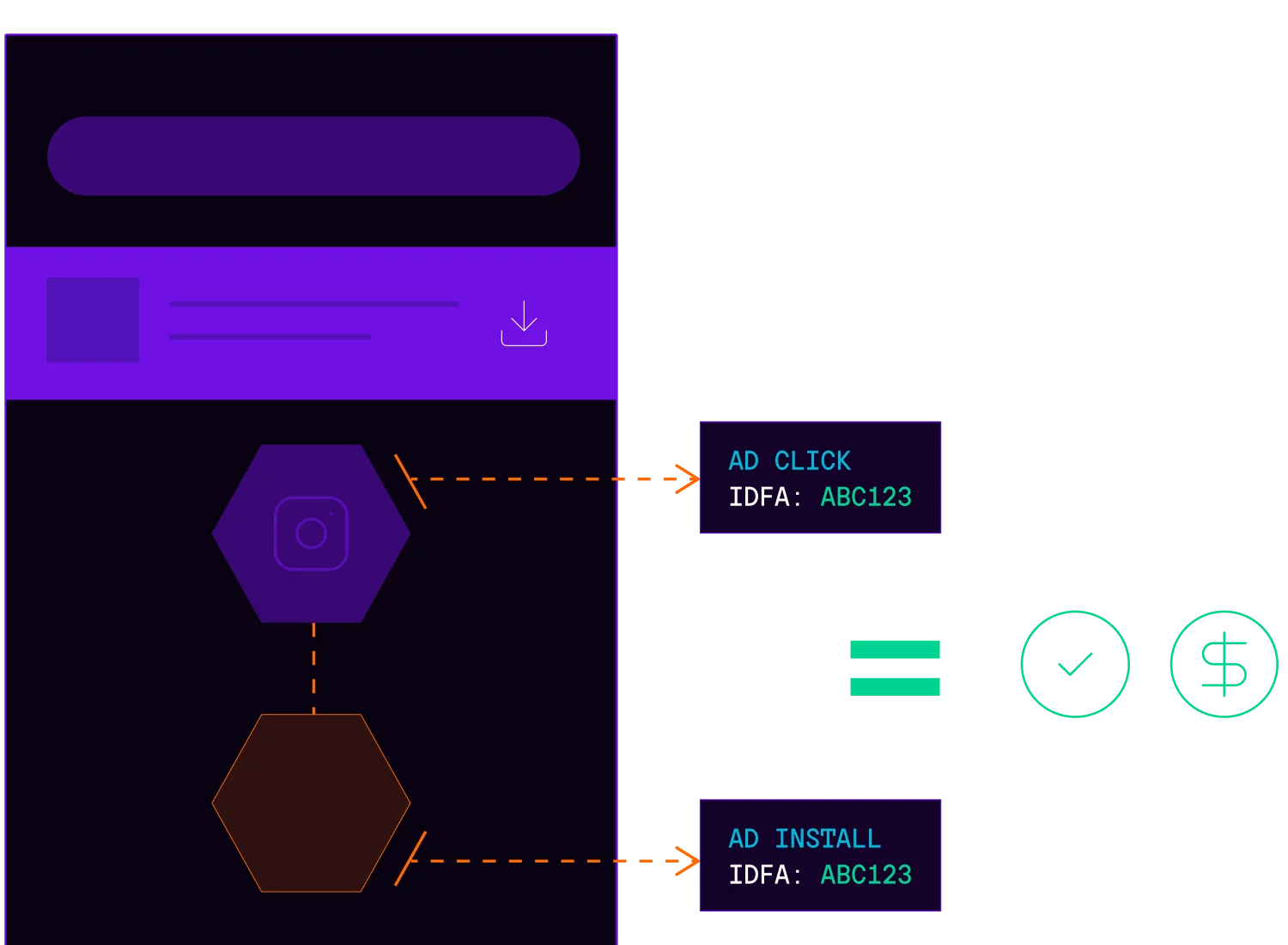
IDFA, which stands for Identifier for Advertisers, is a 128-bit identifier formatted as an universally unique identifier (UUID) (for example: A1B2C3D4-E5F6-7890-ABCD-EF1234567890) that Apple assigns to each iOS device. Unlike hardware-based identifiers, IDFA is resettable. Users can generate a new one at any time through their device settings, which was a deliberate privacy improvement over its predecessor.
Apple introduced IDFA in iOS 6 (2012) specifically to replace the Unique Device Identifier (UDID). UDID was a permanent hardware-level identifier that advertisers and developers used extensively, but it created serious privacy concerns because it couldn’t be changed or reset. Once a UDID was associated with a user profile, that connection was difficult to break. IDFA solved this by creating an advertising-specific identifier that users could reset, and Apple later layered on a Limit Ad Tracking (LAT) toggle in Settings that let users zero out their IDFA entirely, giving people meaningful control over how their device was tracked across the ad ecosystem.
How IDFA works and what it’s used for
IDFA functions as the common thread connecting ad exposures to user actions. When you tap an ad, the ad network captures your device’s IDFA. After you install the app, the mobile measurement partner’s (MMP) software development kit SDK reads that same IDFA and matches it to the earlier click, confirming the ad drove the conversion. This deterministic matching process is what made iOS campaign measurement so precise for nearly a decade.
Beyond install attribution, IDFA powered four critical advertising functions:
- Attribution lets marketers trace exactly which creative, channel, or campaign drove each install and in-app event.
- Audience targeting enabled advertisers to build behavioral segments (for example, reaching users who engaged with fitness content) and serve relevant ads across the app ecosystem.
- Retargeting allowed apps to re-engage lapsed users by passing their IDFAs to ad networks, which would then serve personalized ads in other apps.
- Frequency capping used IDFA to limit how many times a specific device saw the same ad, preventing wasted impressions and protecting user experience.
Together, these functions created a closed loop where marketers could connect ad spend to specific user actions and revenue outcomes with far more precision. The challenge today is that this loop only works when users grant tracking permission, and most don’t.
What changed with iOS 14.5 and App Tracking Transparency
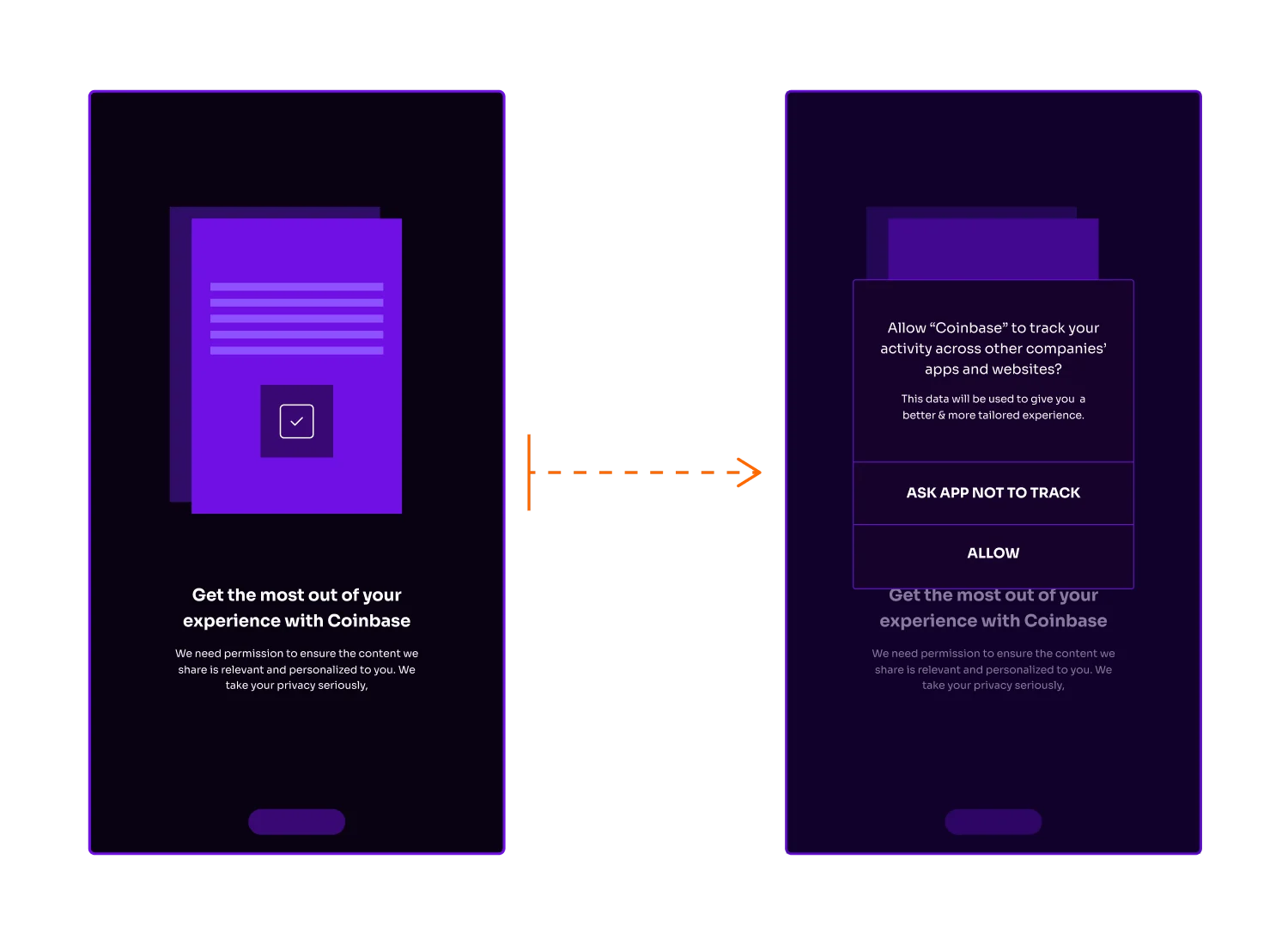
Before April 2021, apps could access IDFA automatically. iOS 14.5 ended that. Apple’s App Tracking Transparency (ATT) framework required every app to explicitly ask users for permission before accessing their IDFA, using a standardized system prompt: “Allow [App Name] to track your activity across other companies’ apps and websites?” Apple lets developers add a one-sentence purpose string below the prompt, set through the NSUserTrackingUsageDescription key in Info.plist. Most brands use this space to communicate the value users get in return for allowing tracking, like personalized recommendations, relevant ads, or a better in-app experience.
Users can allow tracking or ask the app not to track, and opt-in rates vary widely by app category, country, and prompt strategy.
By early 2022, Meta’s CFO was telling analysts the iOS changes had cost the business something “on the order of $10 billion” that year. Publishers felt the impact, watching personalized ad revenue tank in apps that leaned on IDFA-based monetization. For most teams, the problem was further downstream: iOS reporting itself stopped behaving the way it used to.
ATT forced a complete rebuild of iOS measurement infrastructure. The industry had to evolve rapidly. The frameworks that emerged look fundamentally different from what came before.
When is IDFA available today, and what are the alternatives?
Post-ATT, IDFA is only accessible under specific conditions:
- The user must have granted tracking permission via the ATT prompt.
- The app must have implemented the AppTrackingTransparency framework correctly.
- The user’s tracking permission must still be active in iOS settings.
Children’s apps and apps in certain categories face additional restrictions. Given limited and variable opt-in rates, most marketers can’t build a reliable measurement strategy on IDFA alone.
Apple’s answer to this gap is SKAdNetwork (SKAN), a user privacy-focused attribution framework that operates on aggregated, anonymized data rather than device-level identifiers. IDFA-based attribution tells you exactly which user installed your app after seeing which ad. SKAN tells you that a campaign drove a certain number of installs within a reporting window, without exposing any individual user’s identity. The tradeoff is significant: granularity, real-time reporting, and user-level optimization signals are replaced with gain measurement coverage across your entire iOS audience regardless of ATT consent status.
Modern iOS attribution requires both approaches working together. IDFA-based measurement delivers precision for opted-in users while SKAN delivers coverage for everyone else. Measurement accuracy in 2026 depends on platforms that can support both frameworks and unify their outputs.
How modern attribution platforms adapt to IDFA limitations
Marketers who have adapted successfully do not rely only on higher ATT opt-in rates. They’re the ones who’ve built measurement infrastructure that works across both deterministic and privacy-compliant methodologies simultaneously.
Branch attribution combines IDFA-based matching for opted-in users with privacy-centric attribution for everyone else. For opted-out users, that means integrating SKAdNetwork postbacks and Predictive Aggregated Measurement (PAM) — a modeling-based approach that fills the gaps SKAN leaves behind — into a single view of campaign performance.
In practice, this approach delivers several concrete advantages:
- Hybrid attribution automatically routes to the best available measurement method based on each user’s consent status, so you can capture the strongest available attribution signal for each user journey.
- Aggregated campaign insights from SKAdNetwork’s conversion values surface optimization signals even when device-level data isn’t available.
- Cross-platform normalization reconciles data from self-attributing networks like Meta, Google, TikTok, Snap, and Apple Search Ads with SKAdNetwork postbacks and web analytics, giving you a consistent view of incremental impact across your full marketing mix.
Measuring iOS performance in 2026 means working with whatever data is available, whether it be deterministic matching where users have opted in modeling-based approaches like PAM and SKAdNetwork postbacks where they haven’t. Branch Performance pulls that together into a single view. That’s what Branch Performance is built to do.
Frequently asked questions about IDFA
Yes, you can still find your device’s IDFA, but iOS no longer surfaces it as plainly as earlier versions did. Users can manage app tracking permissions by going to Settings > Privacy & Security > Tracking. When tracking is disabled or permission is denied, apps cannot use IDFA for cross-app tracking, and developers may receive a zeroed-out identifier instead.
Android’s equivalent device ID is the Google Advertising ID (GAID). Both identifiers support ad measurement without exposing permanent hardware IDs, and both are resettable by users. The key difference is consent: Apple’s ATT framework requires explicit opt-in before apps can access IDFA, while Android has historically been more opt-out based, though Google continues tightening privacy controls.
Whether IDFA qualifies as personal data varies by jurisdiction, though the regulatory trend is clear. Under EU’s GDPR, device identifiers like IDFA are generally considered personal data when they can be used to single out an individual, which means processing them typically requires a lawful basis such as consent. California’s Privacy Rights Act (CPRA) similarly classifies advertising identifiers as personal information subject to consumer rights. Apple’s ATT requirements also reflect the sensitivity of IDFA, requiring explicit user permission, which signals the direction regulators are heading globally. If your app operates in multiple market